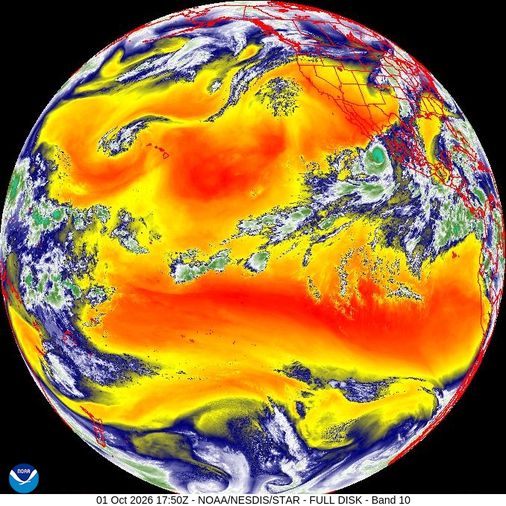
Well, 2026 has brought us the predicted Super El-Niño, affecting weather patterns all around the world. This weather pattern repeats at an irregular interval, ranging from 2 to 7 years in between each El-Niño event. The El-Niño event is characterized by a period of abnormally high ocean surface temperatures in the tropical latitudes of the Pacific.
El-Niño events last about a year, producing higher humidity in the western hemisphere, including North and South America, but can also affect the rest of the world raising the chances for extreme weather events globally.
What does this mean for my Evaporative Cooler?
Unfortunately, it's not good news. El-Niño brings higher humidity, reducing the effectiveness of evaporation, meaning your cooler will produce both more humid and warmer temperatures than usual.
What can I do to mitigate the effects of El-Niño?
All is not lost. While you can't make an evaporative cooler work 100% of the time, you can make some important changes to improve your comfort.
Here are my top 5 tips for dealing with what I call "borderline" days, when I'd usually switch to A/C, but would rather wring out some more energy savings with my swamp cooler.
Top-5 tips (reverse order)
Keep scrolling to see my #1 tip!
5. Always run the fan on High.
A higher fan speed means the outside air spends less time passing over the cooler's wet pads, meaning the air has a shorter "residence time" over the pads, allowing less moisture to transfer into the air. Of course, it's always a trade-off between adding moisture and lowering temperature, so you'll get slightly warmer air too. But it will also be slightly drier.
4. Ensure you have plenty of ventilation with open windows or doors
This can be a sneaky one. If you're not allowing 1-2 square feet of ventilation for every 1,000 CFM of fan power, you're unintentionally reducing the airflow rate. This causes the same "residence time" to increase which also raises humidity. Always ensure you have plenty of ventilation to avoid raising the humidity more than it must.
You can test this with the "tissue test". Take a tissue and place it on the window screen of an open window:
- If the tissue clings really tightly to the screen, you need to open more windows or doors to increase the airflow rate.
- If it just barely clings to the screen, allowing you to slide it around or reposition it without it falling, then you've got it perfectly ventilated.
- If the tissue doesn't stick to the screen and falls to the floor, you have plenty of ventilation, and can look at reducing window opening sizes in the parts of your home which don't need as much cooling.
Remember that ventilation is how evaporative cooling works. You need to allow the cool air to flow through the rooms you want cooled, and that cool air has to escape (ventilate) in order for new cool air to replace it.
3. Replace or clean your cooler's pads if they're clogged with minerals and sediment
You might've noticed a theme by this point: airflow rates are very important for evaporative cooling. If you have a very clogged and mineralized pad, whether it's a rigid honeycomb pad or aspen pads, or even the plastic Dura-Cool pads, give them a hard look. If they're clogged up, that will slow down the airflow rate, once again causing the same "residence time" to increase which causes your humidity to increase as well.
In the Evaporative Cooler Forecaster app, you might have tried using the Pad Cooling Pwer slider in the Settings tab to calibrate the app to match your cooler's performance. If you haven't, check out Pad Power to learn more about how it works. The short answer is that "Pad Cooling Power" is a measure of how much humidity your cooler is able to add to the air. With a clogged pad, your "Pad Cooling Power" number might be as high as 75. If you've needed to slowly raise that number from 50 or 55 up to 75 over the course of months or years, that's a sign that your pads need cleaning or replacement. But the best way to know is to look at the pads and see the mineralization with your own eyes.
In my personal experience using rigid honeycomb pads with my Bonaire Durango 4500 whole-home cooler, I find that a brand new OEM pad starts at about a 55 for pad cooling power level. Over time, it crusts up because I have exceptionally hard water. After heavy usage over 18 months, the pad cooling power level rises to around 73. While this gives cooler temperatures immediately in front of the cooler, it reduces the overall effectiveness because the airflow rate is also reduced.
But because we're trying to reduce humidity during this El-Niño event, we want higher airflow, not lower. If you can swap out a crudded up pad for a clean one, you'll see a slight rise in delivered indoor temperatures and a slight drop in delivered indoor humidity.
2. Use a thermostat, and raise the Set-Point temperature
This is almost my #1 tip, but it helps to know why it's only my #2. A conventional evaporative cooler thermostat will turn the whole unit off once it's reached your Set Point temperature. This is great because it prevents the cooler from driving the temperatures lower than you need.
Remember that lower temperatures always mean higher humidity.
By raising your thermostat Set Point (the temperature you _want), you prevent the cooler from running longer than it needs to, reducing the overall humidity it delivers.
Now this isn't perfect, and you can only stretch it so far before you end up with a hot muggy house that feels unlivable. That's time to switch to A/C or find a cooling center or safer place to escape the heat.
If you combine this tip with basic comfort care, like drinking ice water, using a fan directly on your body, using ceiling fans, and wearing light loose-fitting clothes, you might be surprised at your body's ability to acclimatize to a higher-than-usual temperature range. As always, be careful and safe. Heat stroke is deadly and not worth the risk. If you're uncomfortable, do what you can to protect your health and well-being.
This brings me to my #1 tip...
1. Try the RoadRunner Comfort smart controller thermostat
This smart thermostat rewrites the rules for evaporative cooling. It's a marvel of engineering invented by an engineer in Albuquerque, New Mexico to completely re-think the way temperature is regulated when using an evaporative cooler. You can read more about it at RoadRunner Comfort but here's the short version:
It's just like a regular thermostat except instead of shutting off the whole unit when it's reached the set-point temperature, it instead shuts off the water pump, allowing the pads to dry out, while it has a wireless temperature+humidity sensor that monitors the performance of the cooler. It will periodically run the water pump to keep the pads just wet enough to maintain your set-point temperature, while the fan runs at your desired speed (Low or High). The result is a more even temperature delivered from your cooler.
The RoadRunner Comfort thermostat only works with wired-in evaporative coolers, and to be clear, I had to modify my Bonaire Durango by cutting and capping off the cord powering its built-in pump. This was an easy choice for me because my pump was near end of life and I was planning on replacing it anyhow. However, this isn't a supported modification, so only do it if you're particularly handy and comfortable working with electrical wiring in the context of a wet environment. However, most whole-house evaporative coolers have wiring that's compatible with the RoadRunner Comfort thermostat. Check the website for installation instructions before you buy one: RoadRunner Comfort installation instructions
For full disclosure, I was so impressed with the RoadRunner Comfort controller that I've become a volunteer contributor to the project, helping to improve its software and operations. While I'm not financially tied to the company, I'm a big fan.
One of the most exciting differences I've noticed from using the RoadRunner Comfort controller is how much lower humidity I experience in the evening hours in my home. In my home climate, there's a local condition called the "oasis effect" in the summer evenings whenever the wind speed drops to zero and the air is still. All of the vegeatation in the area shifts to respiration in the evening, which emits humidity into the air. This both cools the outdoor air, but also can push the relative humidity up into the 50s and 60s, sometimes higher.
This is how the smart controller shines, because it regulates the temperature so much better, I'm not overdoing the cooling when it's most humid out. It's expanded my range of operable hours for my swamp cooler and dramatically improved my comfort. Even raising the setpoint during a "borderline" humid day, I can stretch my "swampy" usage to cover more weather conditions than before. And stay comfortable while saving energy!